
If your lock will not pair, the keypad is acting strangely, or you have inherited codes from a previous owner, a kwikset smart lock reset can give you a clean start. Start by identifying the exact model and the type of reset you actually need, because a full factory reset is not the right fix for every problem. Keep the door open, use fresh batteries, and expect to set up codes and pairing again if you erase the lock.
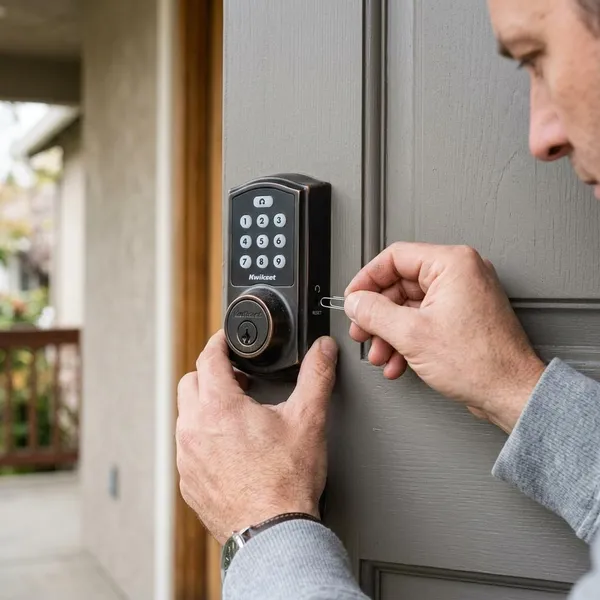
How do you reset a Kwikset smart lock?
Resetting a Kwikset smart lock usually means using an interior Program or Reset button with the battery pack removed and reinserted, but the exact sequence depends on the lock family. The safest order is simple: confirm the model, choose the lightest reset that solves the problem, keep the door open, then wait for the lock's confirmation lights or sounds before setting it up again.
If you just want to remove a house sitter's code, do not factory reset the whole lock. If you bought a used lock, moved into a home, or cannot clear an old app connection, a factory reset is usually more appropriate.
Identify the exact lock model
Look under the interior battery cover, on the inside assembly, in the original paperwork, or in the app that controls the lock. A Halo, Aura, SmartCode, Powerbolt, or Home Connect lock may look similar from the outside, but the reset behavior can be different once the cover is off.
Keep the door open
Leave the door open and unlocked until setup is finished. Many Kwikset locks extend and retract the deadbolt during handing, and a closed or misaligned door can make a good lock look jammed. Open-door testing also keeps you from locking yourself out while codes and app access are still missing.
Remove the lock from its app if required
Connected models may need to be deleted from the Kwikset app or excluded from a smart home hub before the hardware reset. This matters most when you changed phones, replaced a router, moved the lock to another account, or bought a lock that was already paired to someone else.
If the old app record stays behind, the lock may reset physically but still fail during pairing. Clearing the software side first can save several frustrating setup attempts.
Use the model-specific reset button
The Program button, Reset button, and keypad buttons are not interchangeable. On some models, a button starts handing; on others, it enters pairing or clears memory only when held during power-up.
- One button visible: confirm whether it is Program or Reset before holding it.
- Two buttons visible: do not guess; the wrong one may only reboot the lock.
- No app connection: check whether your model uses keypad programming instead.
Wait for the correct light and sound
The confirmation signal is how you know the reset command was accepted. Many Halo and Aura-style resets use a red flash and beep after the button has been held long enough, while other models may use a different light pattern or bolt movement.
If nothing happens, try the practical checks first: install fresh matching batteries, make sure the battery pack is fully seated, and repeat the hold for the full time. Releasing early is a very common reason a reset turns into a normal restart.
Complete handing and setup again
After a factory reset, the lock usually has to relearn bolt direction and travel. Let handing finish with the door open, then test the thumb turn, keypad, and app control before you close the door.
Which type of Kwikset reset do you need?
The best reset is the smallest one that fixes the problem. A factory reset is useful when you need a clean security baseline, but it also creates the most follow-up work. If the lock still works and you only have one access issue, a lighter option may be better.
| Problem you are trying to solve | Better reset choice | What to expect afterward |
|---|---|---|
| You moved in, bought a used lock, or cannot trust old codes | Factory reset | Recreate codes and pair the lock again |
| One guest, cleaner, or former roommate should lose access | Code deletion | Other settings usually stay in place |
| The keypad or electronics froze briefly | Reboot | No codes should be erased |
| The app, Bluetooth, Wi-Fi, or hub connection broke | Network reset or re-pairing | Connectivity setup may need to be redone |
| An old metal key should stop working | SmartKey rekeying | Digital codes and pairing are not changed |
Which Kwikset smart lock do you have?
Model identification decides which instructions are safe to follow. Kwikset has app-based locks, Bluetooth locks, keypad-only locks, and hub-connected locks, so a reset step that works on one family may only start programming mode on another.
Check the inside label first, then use the connection style as a second clue. A lock controlled directly through an app is different from one that depends on a Z-Wave-style hub, and both can differ from a simpler keypad model.
Halo models use the Kwikset app
Halo locks are usually managed through the Kwikset app and often include direct connected features such as Wi-Fi, depending on the exact model. If pairing keeps failing, remove the lock from the app before trying the hardware reset so the new setup does not collide with an old device record.
Aura models use Bluetooth
Aura models are typically Bluetooth-based, so phone distance and app permissions matter more than many people expect. During setup, stand close to the door, make sure Bluetooth is enabled, and allow the app permissions it requests.
If an Aura lock works from the keypad but will not connect from your phone, try fixing the Bluetooth/app relationship before assuming the lock needs a full factory reset.
Halo Select models support newer connectivity
Halo Select models can have newer connectivity behavior than earlier Halo locks, so current app instructions are important. Menus, pairing prompts, and reset support may not match older screenshots or videos exactly.
SmartCode models use model-specific programming
SmartCode is a broad family, not one single reset method. Some versions are simple keypad deadbolts, while others include connected features, touchscreens, or different programming codes.
Powerbolt models use separate keypad steps
Powerbolt locks often use their own keypad programming flow rather than the same app-centered process as Halo or Aura. If the keypad still accepts programming, code changes or mastercode steps may solve the problem without a factory reset.
Home Connect models pair with a smart home hub
Home Connect models are designed to work with a smart home hub. When remote control fails but the keypad still works, the broken link may be the hub relationship rather than the lock itself.
For these models, use the hub's remove, exclude, or unpair process as part of troubleshooting. A clean exclusion and re-inclusion often matters as much as the button sequence on the lock.
How do you factory reset a Kwikset Halo or Aura lock?
Many Kwikset Halo and Aura locks use a similar factory reset pattern: remove the battery pack, hold the Program button, reinsert the battery pack while still holding the button, wait about 30 seconds for the red flash and beep, then press Program once and let handing run.
Remove the interior battery pack
Take off the interior cover and remove the battery pack so the lock loses power. If the batteries are old, mixed, or weak, replace them before starting the reset; unstable power can make the lock miss the reset command or fail during handing.
Hold the Program button
Press and hold the Program button on the interior assembly. Hold it steadily rather than tapping it, because the lock needs to see the button pressed during startup.
Reinsert the battery pack
While still holding Program, slide the battery pack back into place. Make sure it seats fully and the contacts connect cleanly. If the lock powers on and off or gives no response, remove the pack and reseat it before trying again.
Hold for about 30 seconds
Keep holding the button for about 30 seconds. It can feel longer than expected, so using a phone timer helps.
Release after the red flash and beep
Release the Program button after the red flash and beep, if your model uses those signals. That confirmation usually means the reset command has been accepted.
Press the Program button once
Press Program once after the reset confirmation. On many Halo and Aura locks, this moves the lock into the next setup stage so it can complete handing instead of sitting in an erased but unfinished state.
Let the lock complete handing
Let the deadbolt extend and retract without touching it. The lock is learning the door direction and bolt travel, so a blocked bolt can create a false jam reading.
- Test with the door open first.
- Create at least one new access code before normal use.
- Pair the app again only after the lock has completed its basic setup.
- Check auto-lock settings before using it on a main entry door.
What does a Kwikset factory reset erase?
A factory reset usually clears the lock's stored digital setup and returns it close to its default state. The exact items vary by model, but you should plan as if codes, users, pairings, network details, and custom preferences will need to be recreated.
It deletes access codes
Stored keypad codes are normally removed during a factory reset. Afterward, family, guest, cleaner, or service codes should not unlock the door unless you create them again.
It removes user associations
Factory reset can remove local user links and account-related associations, depending on the model. For connected locks, also remove the lock from the app or hub when required so old ownership records do not interfere with the new setup.
It clears Bluetooth pairings
Bluetooth relationships are usually cleared on models that use them. That helps when a phone was replaced, restored, or stuck in a failed pairing loop.
After resetting, stand close to the lock and confirm Bluetooth permissions before pairing again. A weak phone connection during setup can look like a bad reset even when the lock is fine.
It clears Wi-Fi or hub settings
Wi-Fi credentials or hub enrollment data may be erased. This can help after a router change, internet provider change, or smart home hub replacement, but remote access will not return automatically.
It removes event history from the lock
Many models clear activity stored locally on the lock, such as recent lock events or failed attempts. If that history matters, look at the app before resetting. Some records may exist outside the lock, but local data should be treated as disposable once the reset starts.
It restores default lock settings
Custom settings such as sound, auto-lock timing, handedness, and calibration may return to default behavior. Before calling the job finished, check the settings you actually depend on, especially auto-lock on a busy family entrance or a rental property door.
Conclusion
The right reset depends on what you are trying to fix: use code deletion for one person's access, a reboot for a temporary glitch, network steps for pairing trouble, SmartKey rekeying for physical keys, and a factory reset when you need a clean digital start. If the lock protects a main entry door, slow down, confirm the model, keep the door open, and test everything before trusting the new setup.